

For members
- How it works: Join whops that have Content Rewards enabled. Complete the actions they define, such as finishing a course or posting in the forum, to earn rewards.
- Where to see it: Inside the whop, look for a Rewards, Points, or Content Rewards section or your progress dashboard.
- Redeeming: Rewards and how you use them depend on what the creator set up (e.g. badges, unlockable content, or discounts).
For creators: Content Rewards marketing campaigns
Content Rewards is a marketing tool that connects your brand with content creators — they make content about your brand and you pay them for the number of views they get.About the rewards feature
Content Rewards is a tool to incentivize your customers to talk about your brand. They create content, post it to their social media, and you pay them based on views — but only after you approve their post. There are two types of campaigns you can run with Content Rewards:- Content clipping: Creators turn your existing long-form content (podcasts, livestreams, webinars) into short clips for TikTok, YouTube Shorts, X, and Instagram Reels. This option works well when you have:
- Podcasts or livestreams with great moments
- Webinars with key talking points
- Educational videos with quotable segments
- Any long-form content that could work as short clips
- User-generated content: Creators produce original content featuring your brand based on guidelines you provide. Great for:
- Customer testimonials and success stories
- Brand awareness campaigns
- Showing your services in action
How the rewards feature works
Content Rewards is an automated system that manages creator relationships and payments:- Set up your campaign: Choose your campaign type (clipping or user-generated content) and provide details about your brand and campaign goals.
- Configure payment settings: Set how much you will pay per 1,000 views and your campaign budget.
- Creators make and distribute content: Creators post content to their social media accounts according to your guidelines and requirements.
- Review submissions: Check submissions to see whether creators have followed your requirements, approving the ones that do and rejecting the ones that don’t.
- Performance tracking and payments: After approving a submission, Whop automatically pays the content creator based on the number of views they got.
Set up your first campaign
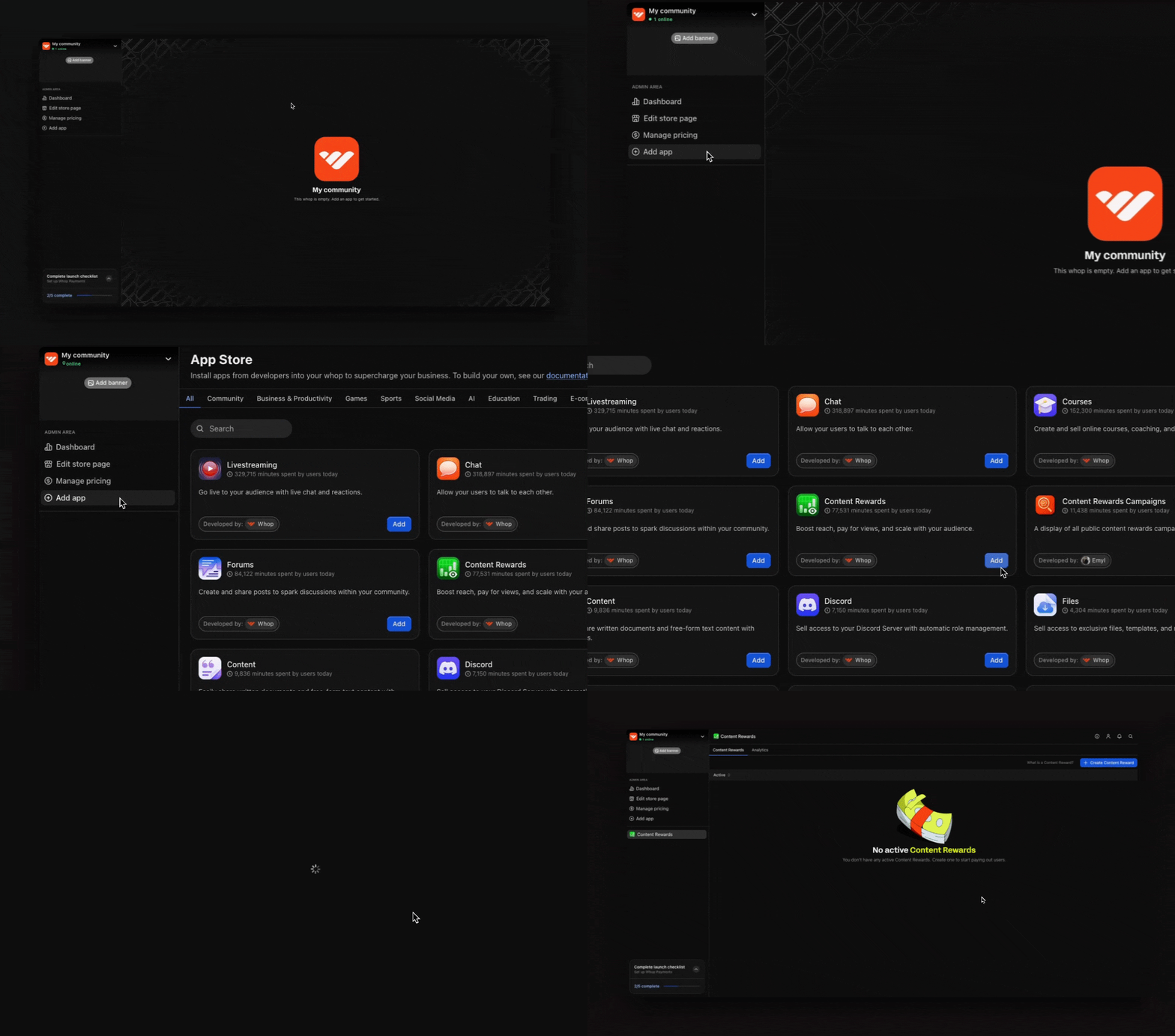
Step 1: Add the Content Rewards app to your whop
- Go to your whop and select Add app to go to the Whop App Store.
- Select Content Rewards from the available apps.
- Select Add to include it in your whop.
Get started with Whop
If you don’t have a whop yet, select this card to learn how to set up your
account.
Step 2: Create your first campaign
When you add the Content Rewards app, you’ll see a form with all the settings you need to configure. Here’s what each field means and how to set it up: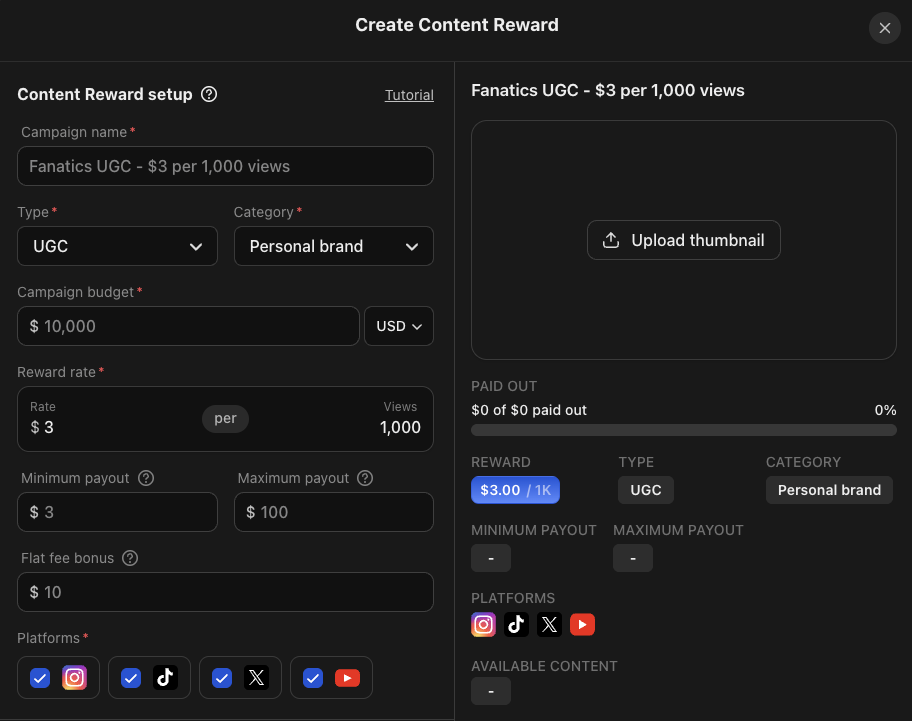
1
Campaign name
Creators see your campaign name publicly, so make it clear and appealing.
- Enter a descriptive name that represents your brand or specific campaign (e.g. Laptop Lunch Prep UGC Campaign)
- You can also include your reward rate in your title (Fanatics UGC - $3 per 1,000 views) to entice content creators
2
Campaign type
Select the type of content you want creators to make:
- Clipping: Creators take your existing videos or podcasts and turn them into short-form content
- UGC (User-Generated Content): Creators make original content featuring your brand
3
Brand category
Pick the category that best represents your brand. This helps creators understand your niche and create better targeted content.
4
Campaign budget
Enter the total amount you’re willing to spend on this campaign. Think of this like ad spend, but instead of paying a platform directly, you’re investing in creators who will promote your brand. You can select your preferred currency from the dropdown menu.
5
Reward rate
Set how much creators earn per 1,000 views on their videos.
6
Minimum payout
Choose the minimum amount a creator can earn from a video before it reaches your review queue. If you choose $0, you’ll need to review every video submission, even those with only a few views. To focus on quality content that’s performing, choose a minimum payout amount.
- Example: With a $3 reward rate and $6 minimum payout, only videos with at least 2,000 views enter your review queue ($3 × 2 = $6 earned).
7
Maximum payout
Cap how much a single creator can earn from one video to protect your campaign budget. Without a cap, one video with hundreds of millions of views could consume your entire budget, leaving nothing for other creators. The maximum payout ensures your budget gets distributed across multiple creators and videos.
- Example: With a $3,000 maximum payout and $3 reward rate, a creator stops earning once their video hits 1 million views, even if it continues growing.
8
Flat fee bonus (optional)
When you choose a flat fee bonus, every approved submission earns both the view-based reward AND the flat fee amount. This can help attract more creators, especially when you’re launching a new campaign.
- Example: With a $3 reward rate, $10 flat fee, and 2,000 views, a creator earns $16 total ($6 from views + $10 flat fee).
9
Platform selection
Choose which social media platforms you’ll accept submissions from.
10
Available content
This is where you communicate what you want and give creators everything they need to make great content for your brand. Here’s what to include:
- Brand guidelines and details about your brand
- Your campaign goals and messaging
- Examples of content that’s worked for your brand (case studies, successful hooks, etc.)
- For clipping campaigns: Access to your video footage and any assets they can use
11
Requirements
Clearly outline the rules creators must follow before you approve and pay their submissions:
- Content quality standards
- Brand mention requirements
- Prohibited content guidelines
- Video length or format specifications
- Any required messaging
Step 3: Fund and launch your campaign
After creating your campaign, you’ll see the Add budget popup automatically. To add funds:- Pick how you want to pay (whop balance, card, Cash App, etc.)
- Enter the amount
- Select Send
Top up your balance
You can add more money anytime by:- Selecting the three dots (···) on your campaign
- Selecting Add budget
- Entering the amount and selecting Send